
MarkManager automates the surrounding workflow to provide an end-to-end assessment solution for certifying authorities, awarding bodies, testing organisations and other educational institutions.
MarkManager's architecture supports web-based access to reliable and highly scalable application servers. Only a supported web browser is required on the client device. This "zero deployment" model simplifies implementation and extends application reach.
The solution can be securely accessed as a hosted service, under the "Software as a Service" (SaaS) model, or licensed on-premise. MarkManager as a service supports both multi-tenanted and fully virtualized implementations. For pen-and-paper examinations, script scanning can be included in one overall service to provide a complete solution.
Marking of each course within MarkManager is an independent exercise. For any given course the marking process has two main phases, the first preparatory and the second beginning as soon as an online test is completed, or once examination scripts are collected and assembled from exam centres.
MarkManager supports paper-based scripts and responses entered on-line by candidates, projects, assignments and both video and audio recordings. In a controlled on-line environment, markers access the responses remotely over the Internet for marking.
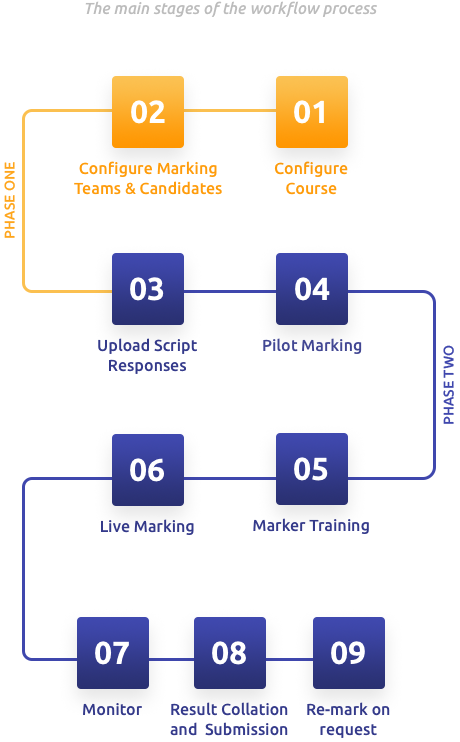
A panel leader ("Supervisor of Marking") determines a marking strategy for the course, and reflects that against the online test or (for pen-and-paper examinations) a scanned image of the course's master script. Allowable mark ranges are specified by question and item. Specialised or split marking (segmentation of the script into answers to be marked by different marking teams) is reflected against the script, which is also masked and cropped as required, e.g for anonymity of the candidate and the examination centre.
MarkManager empowers the customer to configure each course using internal resources.
Marker and candidate data is uploaded via a standard interface with the customer's Examination System. The panel leader assigns a profile to each senior marker and marker, determining for example which questions can be allocated to the marker and how many logon scripts will be presented.
For online tests, item responses are passed to MarkManager using the IMS Question & Test Interoperability (QTI®) standard or such other exchange format that is agreed between the parties. To process pen-and-paper examinations, MarkManager is compatible with industry-standard scanning equipment for preparation and upload of completed scripts, tagged by identifying data. Script page numbers are automatically checked to verify scanning integrity.
Each script, whether online or pen-and-paper, is allocated a unique random number as its identifier for control purposes and so that scripts can be presented in a random sequence at marking time. For examinations with spoken responses and for videos of performances, digital recording upload is supported.
Senior markers develop marking benchmarks and guidelines for each course. If applicable under your policies, senior markers first carry out wide reading of completed scripts and then carry out test marking before categorizing selected scripts for subsequent reference by MarkManager.
Available script categories in MarkManager include:
- Wide reading
- Benchmark (example for marker reference of specific mark allocation)
- Practice (for marker familiarisation and training)
- Logon (start-up script after marker's logon), and
- Quality assurance (seeded script to check marker accuracy).
Markers review the marking scheme and guidelines, before conducting wide reading, followed by practice marking. When a marker consistently marks in the expected range as set by the benchmarks, he/she is authorised to proceed to actual marking.
System-wide and course-level parameter settings determine the policy to follow at this point of the cycle.
After each logon by a marker, he/she must first correctly mark the designated number of logon scripts before proceeding. Markers can set display preferences to suit their comfort and working style. MarkManager ensures marks awarded for each question are within range, and that no responses are missed, via a "non-attempt" facility. Pre-marked quality assurance scripts are seeded into the workload to verify continuing marker performance to required levels of consistency. Markers can annotate a script with comments and place scripts on hold for referral to a supervisor. Workflow support ensures supervisor and marker collaboration is optimised.
Daily and total quotas apply and can be adjusted when necessary. A marker can search scripts he/she has already marked on certain criteria, for example by range of marks for specified question parts, if marks previously awarded need to be reviewed.
Double marking is carried out to the ratio specified in the marking scheme. Scripts for double marking are presented in random sequence to a second marker who does not have access to earlier marks and annotations. Such blind marking preserves the integrity of the marking process. MarkManager then automatically determines whether the difference between marks constitutes a discrepancy, and actions accordingly.
Supervisors monitor marking as it is conducted and have a real-time dashboard to report on marker performance against logon and quality assurance scripts and to highlight any unusual pattern in the range of marks a given marker has awarded. Supervisors can view any script of any marker and the marks awarded. Corrective action can be initiated immediately. Throughput and progress to completion statistics are also available on-line to assist management of the overall process.
After marking is complete, marks for every question of every script are available. Each candidate's raw mark for the total script is automatically calculated. After careful and thorough system checks, the overall results are collated and submitted to the relevant examination agency electronically.
After marks have been distributed, some examining bodies provide the opportunity for candidates to request a second marking if they believe their marks do not reflect the candidate's true achievement. Once a course is subject to re-mark requests it is flagged as being subject to review, and affected scripts are released for a further round of marking. Once all re-marking is complete the results are collated and re-submitted to the relevant examination agency electronically as before.